Positions and goalkeeper planning
Plan soccer substitutions around the positions your team needs.
Choose where your players can play and how you want to line up. The Coach Meister soccer substitution app plans the subs around those choices, helping you share playing time while keeping the positions you need covered. Check the plan before kickoff and adjust the setup if it doesn’t suit your team.
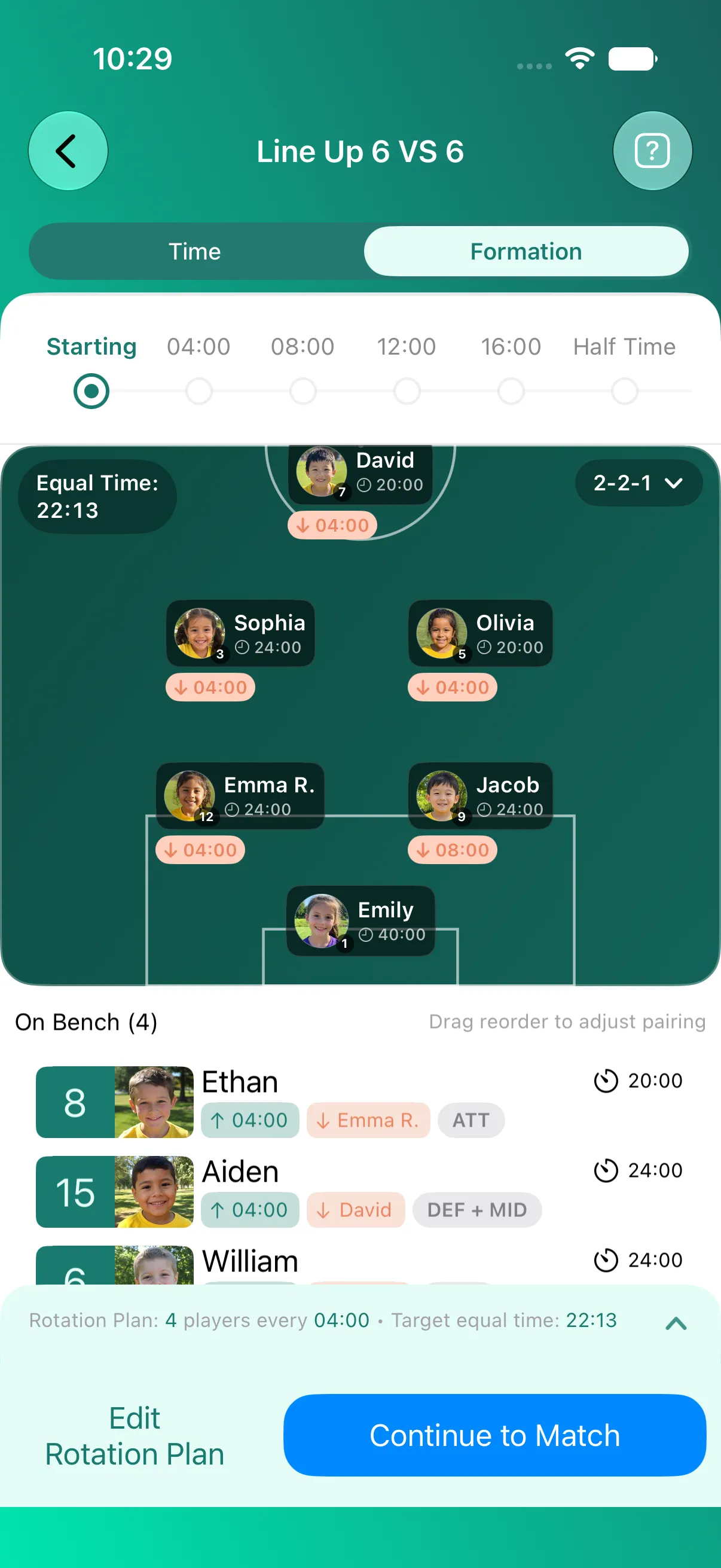
01 · Formation
Start with the shape you want to play.
Choose your formation, then tell Coach Meister who can play where.
Start with a formation that suits your match and the players you have today. Your soccer formation sets how many players you need in defence, midfield and attack. Putting players on the pitch sets the starting lineup. Saving their roles tells Coach Meister where it can use them when planning the subs.
-
GK · 2–2–1
Two at the back, two in midfield, one up front.
1 keeper 2 defence 2 midfield 1 attack
-
GK · 3–1–1
Make room for a third defender.
1 keeper 3 defence 1 midfield 1 attack
-
No goalkeeper · 3–2–1
No keeper: all six play outfield.
No keeper 3 defence 2 midfield 1 attack
-
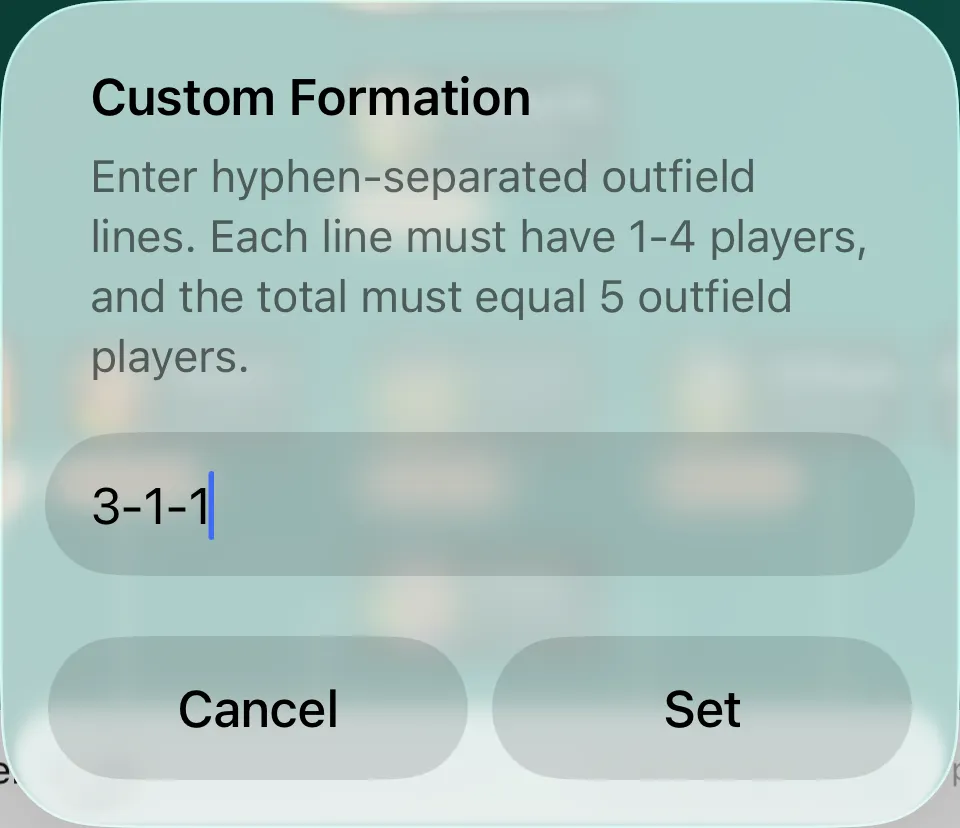
Custom formation · 3–1–1
Type your own lines. They just have to add up.
1 keeper 3 defence 1 midfield 1 attack
02 · Who can play where?
Tell Coach Meister where each player can play.
Choose defence, midfield, attack or goal for each player. You can choose more than one when you want a player to try different parts of the pitch. Coach Meister calls these groups roles. Putting a player in the starting lineup does not save those choices.
| Player | Defence | Midfield | Attack | Keeper |
|---|---|---|---|---|
| Emily | Role not selected | Role not selected | Role not selected | Selected role |
| Emma R. | Selected role | Role not selected | Role not selected | Role not selected |
| Sophia | Role not selected | Selected role | Role not selected | Selected role |
| Aiden Flexible player | Selected role | Selected role | Role not selected | Role not selected |
| David | Role not selected | Role not selected | Selected role | Role not selected |
| Noah | Role not selected | Selected role | Role not selected | Role not selected |
| Jacob | Selected role | Role not selected | Role not selected | Role not selected |
| Olivia | Role not selected | Selected role | Role not selected | Role not selected |
Aiden has defence and midfield selected, so Coach Meister can use him in either group when planning the subs. He can still only fill one place at a time. You can change these choices as players try different positions.
03 · Roles in the rotation plan
Share playing time with sensible subs.
Let those choices shape the rotation.
When you turn on planning by position, Coach Meister looks at where you’ve said each player can play when working out a sub. Flexible players give you more options, while some positions may have fewer replacements.
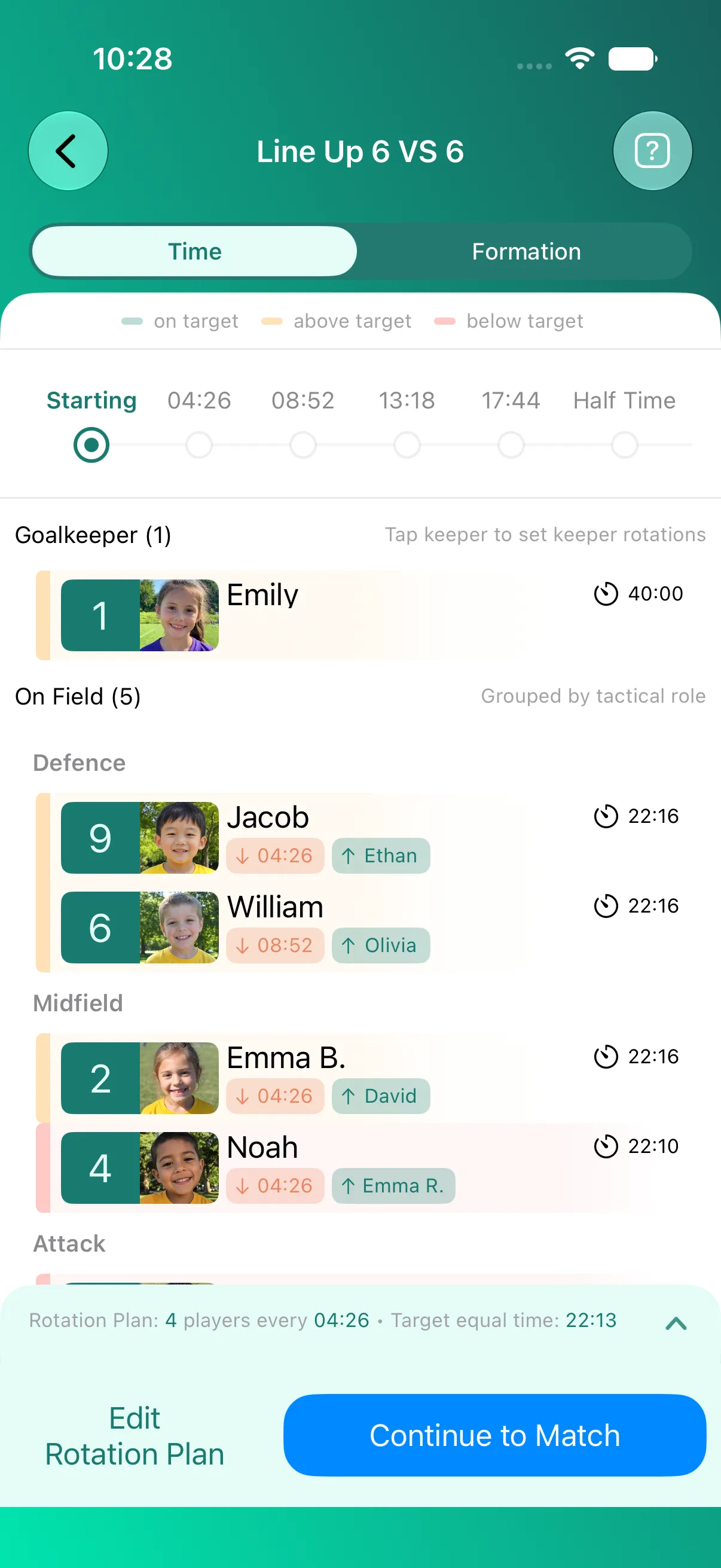
-
Step 1 · Set your roles
Players are grouped by the positions they can play.
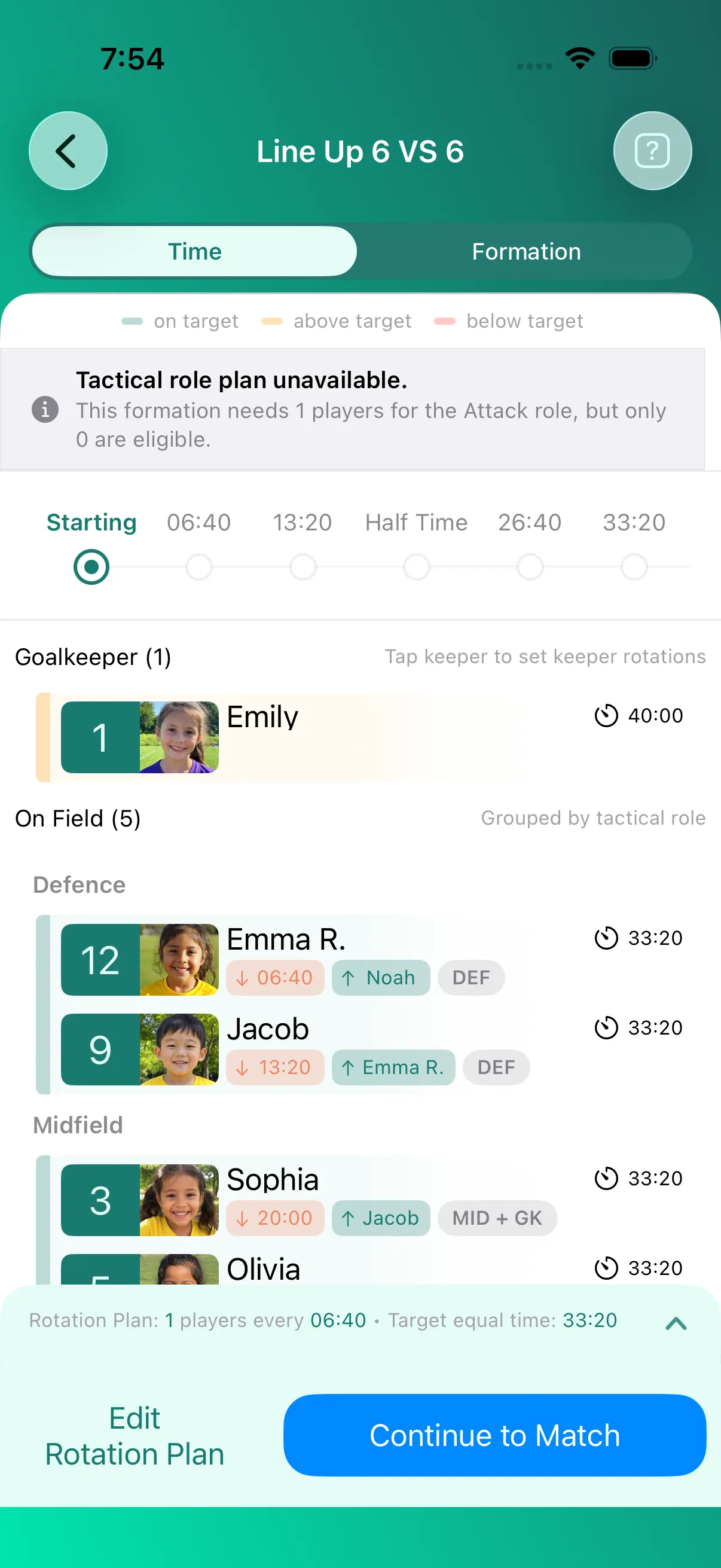
The Time view shows each role group and every player’s planned minutes.
-
Step 2 · Run the subs
When the countdown hits zero, Aiden takes Jacob’s place.
Aiden can play defence; Ethan only plays attack. The 2–2–1 shape holds.
David is the only player who can play attack here, so he can’t simply come off without leaving attack empty. That’s why planned minutes can differ. See how to fix a gap.
Fairer playing time. Sensible subs. Sorted.
04 · Goalkeeper
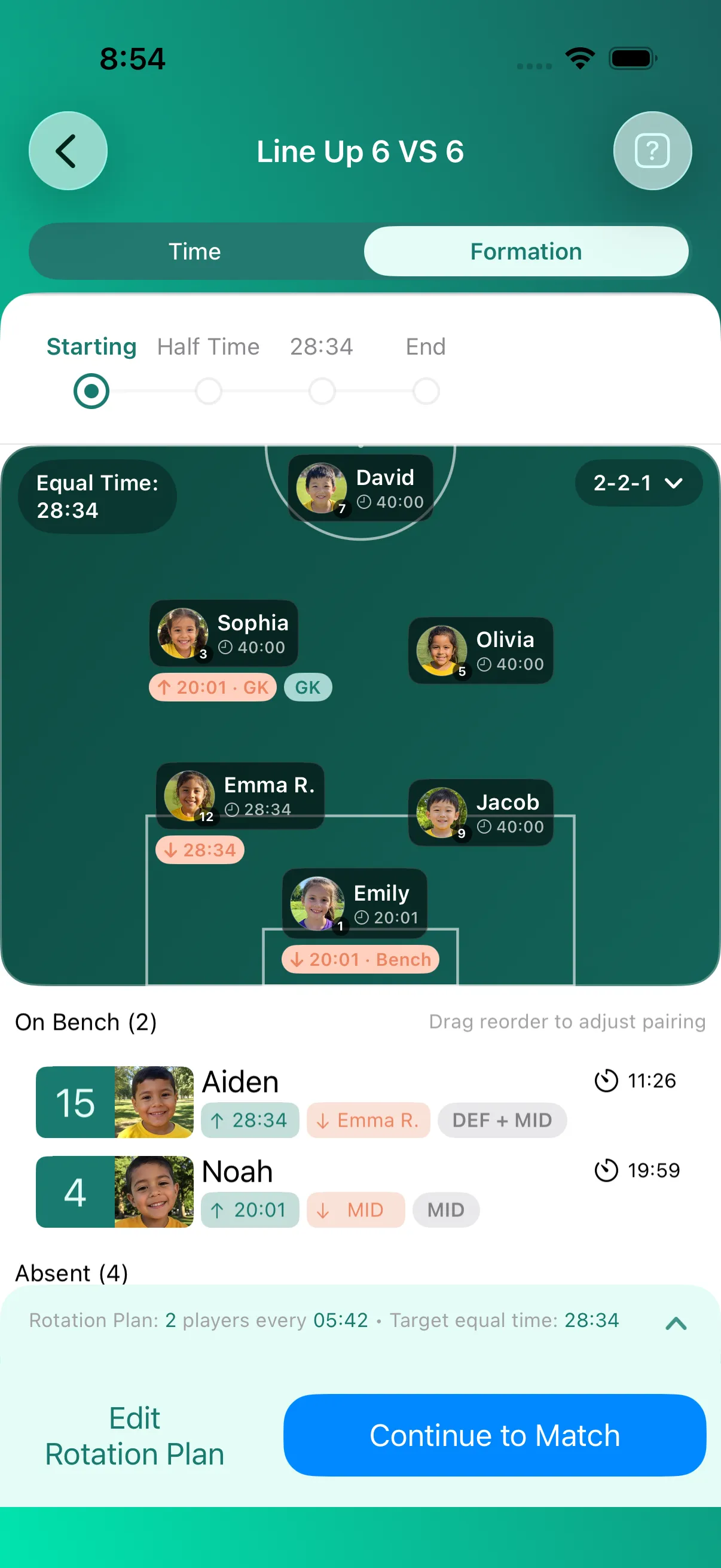
Plan goalkeeper turns without reshuffling the team.
Choose who takes a turn in goal and in what order. Players can move into goal from the bench or the field, then return to the bench or an outfield position they can play.
05 · Check coverage
Spot coverage problems before kickoff.
If nobody can cover a position, Coach Meister highlights the gap and guides you through filling it before kickoff.
- No one available for a position. Coach Meister shows which role needs cover, helping you adjust player roles or choose a formation that fits today’s team.
- The starting lineup leaves a gap. A suitable player is available. Coach Meister helps you spot the gap so you can bring them into the starting lineup.
Common questions
Do I have to set player roles?
No. You don’t have to plan by position. If you want Coach Meister to use your choices, save where each player can play, then turn on Use tactical role groups when planning the subs.
How are goalkeeper change times worked out?
Coach Meister schedules the goalkeeper turns from the match setup and the ordered players taking turns in goal. Review the scheduled times before kickoff.
Does putting a player on the pitch save their roles?
No. Putting a player on the pitch sets the lineup. Save their roles separately to tell Coach Meister where it can use them when planning by position.
Can I choose more than one position for a player?
Yes. Coach Meister groups positions into defence, midfield, attack and goalkeeper for rotation planning. You can choose more than one group for a player, but they can only fill one place at a time.
Can I use one goalkeeper for the whole match?
Yes. Choose one starting goalkeeper without adding other players to take a turn.
What if the team cannot cover every required role?
Check the app’s guidance: is someone missing from the available players, or does the starting lineup leave a gap? Adjust the setup, then check the new plan.
Can a goalkeeper also play outfield?
Yes, if you select outfield roles as well as goalkeeper for that player. If only goalkeeper is selected, Coach Meister plans for them to play in goal, not outfield.
Does role planning guarantee equal minutes?
No. Where players can play, who is available and goalkeeper turns can limit the options. Check the planned minutes and adjust the setup if needed. Planned minutes are not a record of time actually played.
Just need a pre-match schedule? The separate browser tool is free to use.
Try the free printable plannerFairer playing time. Sensible subs. Sorted.
Go into kickoff knowing your next subs.
Explore Coach Meister and prepare for your next match. Choose your store below; Android is currently offered through the open test.
For clubs, Coach Meister gives coaches a consistent way to plan playing time while players learn and experience different positions.