Every 5 min
Current- Minutes spread
- 0 min
- Change events
- 9
- Longest bench stint
- 5 min
Free pre-match planning tool
Plan who plays, who rests, and when to make each change.
Example plan
10 available · 7v7 · 50 minutes · halves · rotate every 5 minutes · 3 subs each
Playing-time check
The plan distributes 350 player-minutes across the rotating players. The scheduled spread is 0 minutes; shorter intervals may reduce it but add more sideline changes.
Starting group
Player 1, Player 2, Player 3, Player 4, Player 5, Player 6, Player 7
Goalkeeper duties are not assigned by this plan.
Starting bench
Player 8, Player 9, Player 10
Shorter intervals can improve the minutes spread, but create more sideline events. These are generated comparisons, not a claim of mathematical optimality.
Follow in order
Times use the full-match clock
Kickoff
Start: Player 1, Player 2, Player 3, Player 4, Player 5, Player 6, Player 7
Halftime
| Player | Scheduled | Target | Difference |
|---|---|---|---|
| Player 1 | 35 min | 35 min | 0 min |
| Player 2 | 35 min | 35 min | 0 min |
| Player 3 | 35 min | 35 min | 0 min |
| Player 4 | 35 min | 35 min | 0 min |
| Player 5 | 35 min | 35 min | 0 min |
| Player 6 | 35 min | 35 min | 0 min |
| Player 7 | 35 min | 35 min | 0 min |
| Player 8 | 35 min | 35 min | 0 min |
| Player 9 | 35 min | 35 min | 0 min |
| Player 10 | 35 min | 35 min | 0 min |
| Player | Scheduled | Target | Difference |
|---|---|---|---|
| Player 1 | 35 min | 35 min | 0 min |
| Player 2 | 35 min | 35 min | 0 min |
| Player 3 | 35 min | 35 min | 0 min |
| Player 4 | 35 min | 35 min | 0 min |
| Player 5 | 35 min | 35 min | 0 min |
| Player 6 | 35 min | 35 min | 0 min |
| Player 7 | 35 min | 35 min | 0 min |
| Player 8 | 35 min | 35 min | 0 min |
| Player 9 | 35 min | 35 min | 0 min |
| Player 10 | 35 min | 35 min | 0 min |
| Time | Period | Players on field | Change at end |
|---|---|---|---|
| 0–5 min | 1 | Player 1, Player 2, Player 3, Player 4, Player 5, Player 6, Player 7 | Player 1 off / Player 8 on; Player 2 off / Player 9 on; Player 3 off / Player 10 on |
| 5–10 min | 1 | Player 4, Player 5, Player 6, Player 7, Player 8, Player 9, Player 10 | Player 4 off / Player 1 on; Player 5 off / Player 2 on; Player 6 off / Player 3 on |
| 10–15 min | 1 | Player 1, Player 2, Player 3, Player 7, Player 8, Player 9, Player 10 | Player 7 off / Player 4 on; Player 8 off / Player 5 on; Player 9 off / Player 6 on |
| 15–20 min | 1 | Player 1, Player 2, Player 3, Player 4, Player 5, Player 6, Player 10 | Player 10 off / Player 8 on; Player 1 off / Player 9 on; Player 2 off / Player 7 on |
| 20–25 min | 1 | Player 3, Player 4, Player 5, Player 6, Player 7, Player 8, Player 9 | Player 3 off / Player 1 on; Player 4 off / Player 2 on; Player 5 off / Player 10 on |
| 25–30 min | 2 | Player 1, Player 2, Player 6, Player 7, Player 8, Player 9, Player 10 | Player 6 off / Player 3 on; Player 7 off / Player 4 on; Player 8 off / Player 5 on |
| 30–35 min | 2 | Player 1, Player 2, Player 3, Player 4, Player 5, Player 9, Player 10 | Player 9 off / Player 8 on; Player 1 off / Player 6 on; Player 2 off / Player 7 on |
| 35–40 min | 2 | Player 3, Player 4, Player 5, Player 6, Player 7, Player 8, Player 10 | Player 10 off / Player 1 on; Player 3 off / Player 2 on; Player 4 off / Player 9 on |
| 40–45 min | 2 | Player 1, Player 2, Player 5, Player 6, Player 7, Player 8, Player 9 | Player 5 off / Player 3 on; Player 6 off / Player 4 on; Player 7 off / Player 10 on |
| 45–50 min | 2 | Player 1, Player 2, Player 3, Player 4, Player 8, Player 9, Player 10 | No change |
Generated at coachmeister.com/soccer-rotation-generator · Review the plan before kickoff and adjust for injuries, absences, or match conditions.
The calculation
Equal-playing-time planning starts with the total number of positions available throughout the match. Multiply match minutes by players on the field, then divide by the number of available players.
A 50-minute 7v7 match provides 350 player-minutes. With 10 available players, the target is 35 minutes each. Fixed substitution intervals can make that exact target impossible, so this planner shows the actual scheduled totals and the spread rather than promising perfect equality.
Worked examples
These are planning examples, not universal competition rules. Every figure below is generated by the same calculation engine used in the interactive planner.
| Example | Roster | Match | Target each | Plan spread |
|---|---|---|---|---|
| 7v7 | 10 players, 7 on | 50 min / 5-min rotations / 3 subs | 35 min | 0 min |
| 9v9 | 13 players, 9 on | 60 min / 10-min rotations / 4 subs | 41.5 min | 10 min |
| 11v11 | 16 players, 11 on | 80 min / 10-min rotations / 5 subs | 55 min | 10 min |
350 player-minutes across 10 players creates a 35-minute target. The fixed-window plan finishes with a 0 -minute spread.
Try this setup in the planner above540 player-minutes across 13 players creates a 41.5-minute target. The fixed-window plan finishes with a 10 -minute spread.
Try this setup in the planner above880 player-minutes across 16 players creates a 55-minute target. The fixed-window plan finishes with a 10 -minute spread.
Try this setup in the planner aboveReal match changes
The V1 web planner creates a pre-match schedule. If availability changes before kickoff, update the roster and generate it again. It does not attempt to reconstruct or rebalance a match already in progress.
Coach Meister's mobile app is designed for live use. Coaches can make a manual substitution when the real match differs from the plan, record an out-of-schedule change, and continue tracking the match state and player time.
Read the live-match playing-time FAQ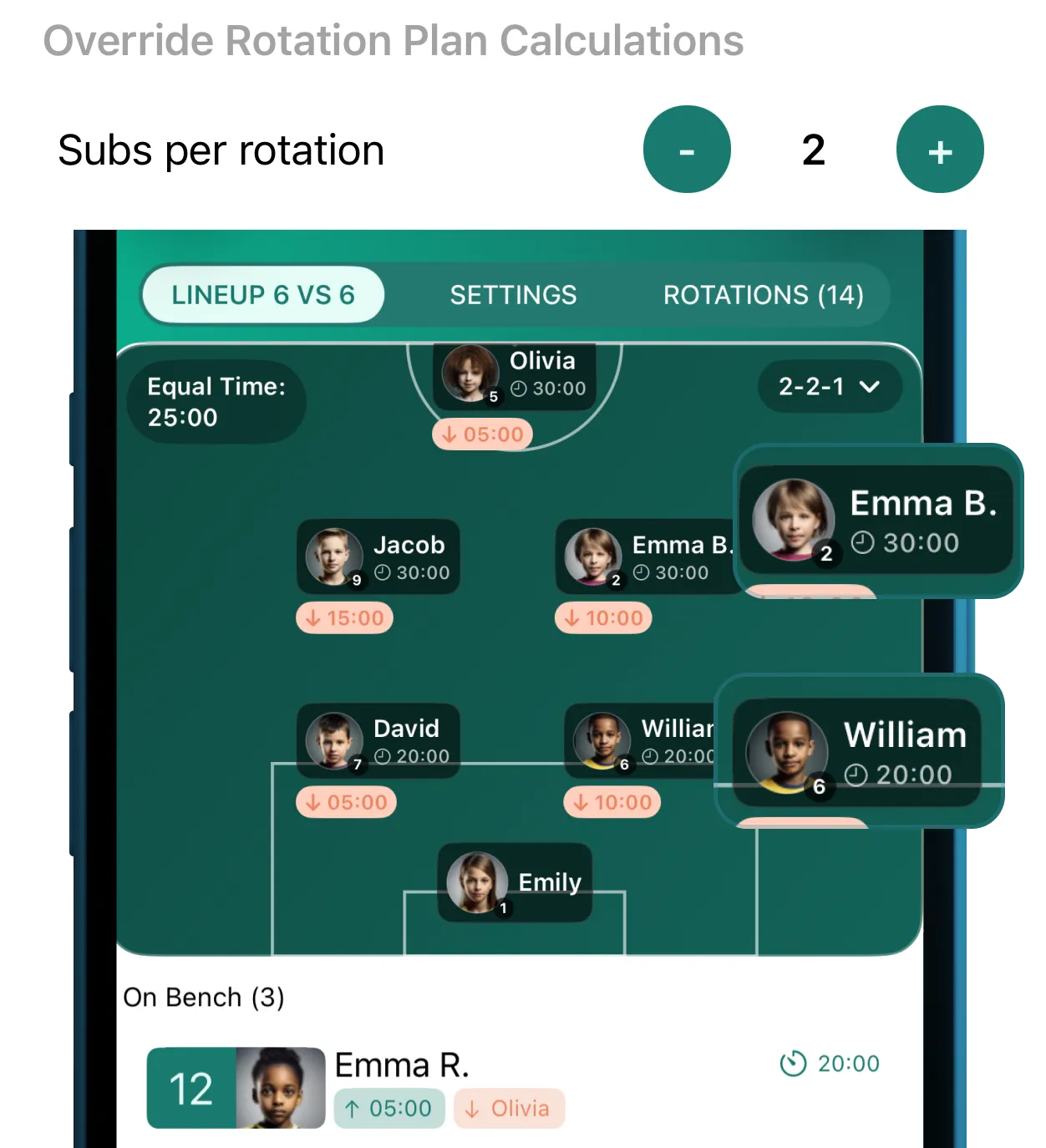
From plan to proof
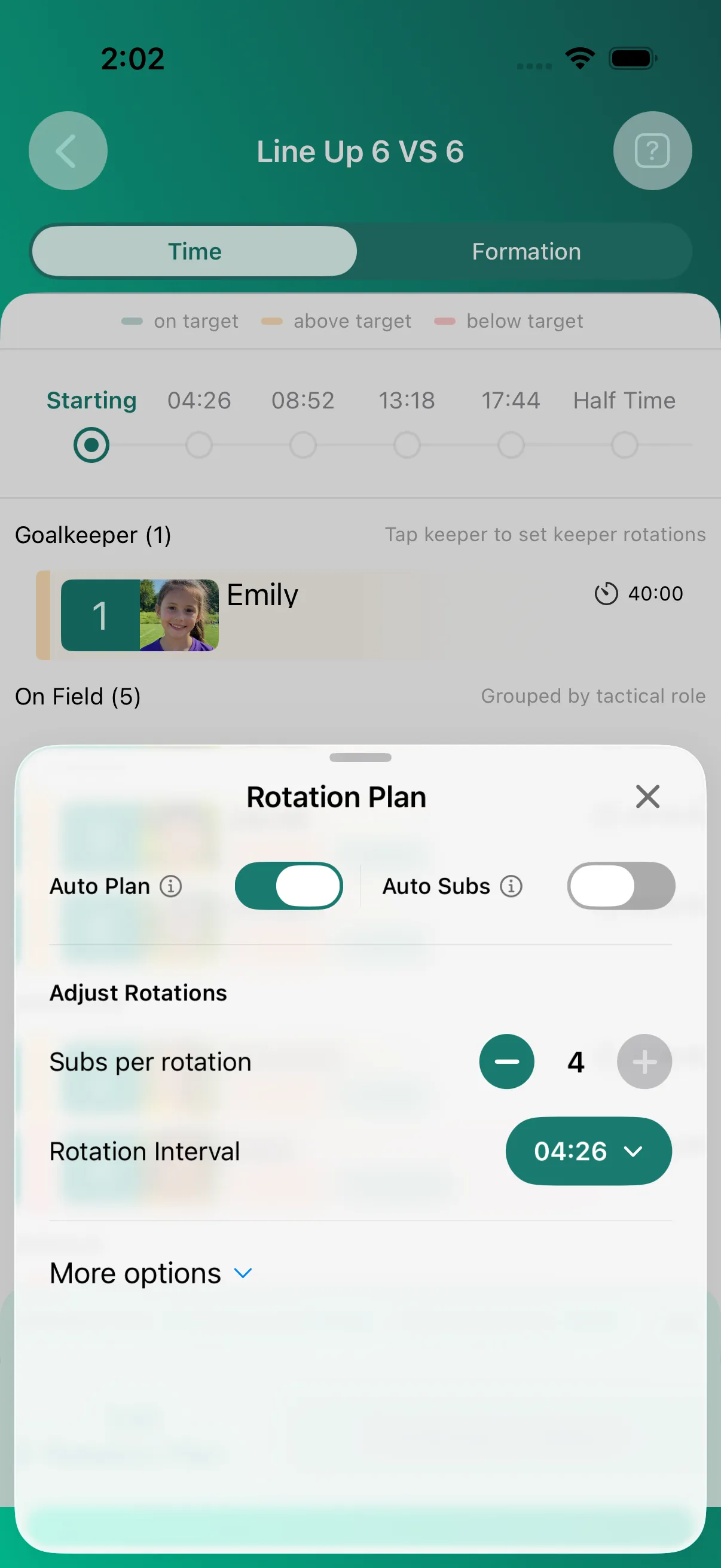
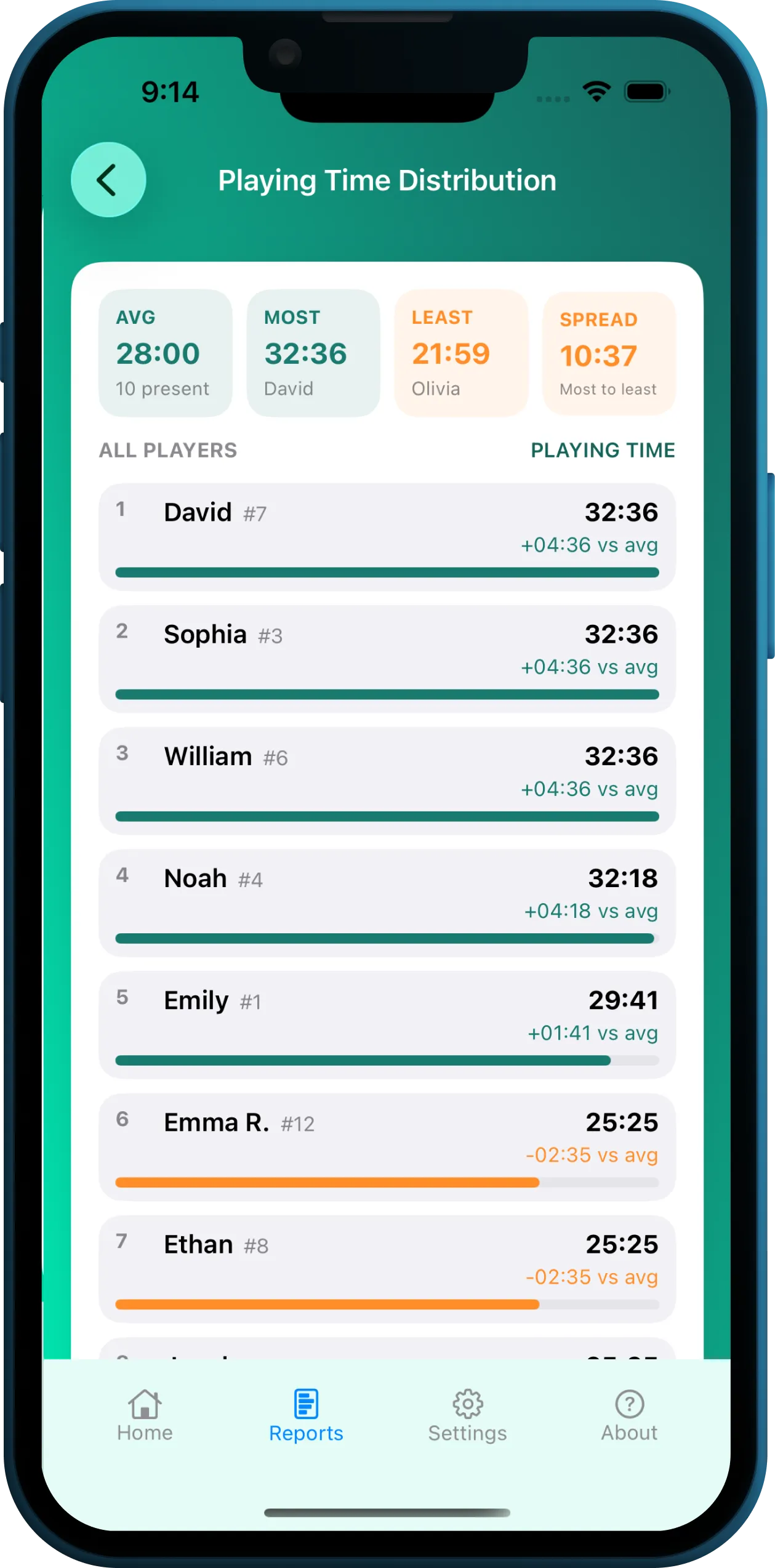
The printable planner answers the pre-match calculation. The app adds rotation controls before kickoff and playing-time evidence after the match.
Methodology and limits
The web planner divides the match into fixed windows, rotates waiting players into the field group using the selected substitutions-per-rotation limit, and uses scheduled minutes plus waiting time to resolve ties consistently. Identical inputs produce the same plan.
Need to plan around player roles and goalkeeper changes? See how positions and goalkeeper rotations work in the Coach Meister app.
Method and examples verified 2026-09-06. This basic browser planner shares Coach Meister's player-minute target formula and fairness goal, but it is not a schedule-for-schedule port of every mobile app rule.
Coaching questions
Yes. Choose a full-match goalkeeper in the planner. That player remains in every rotation window and receives the full match length, while the remaining outfield minutes are shared across the other players. Leave the setting off for keeperless games or rotating goalkeeper duties.
A soccer rotation generator turns a roster, field size, match length, rotation interval, and substitutions-per-rotation setting into a substitution schedule. This web planner also totals each player's scheduled minutes and shows the difference between the highest and lowest totals.
Multiply the match minutes by the number of players on the field to get the available player-minutes. Divide that total by the number of available players to find the target minutes per player. The planner then assigns fixed rotation windows as evenly as its interval allows.
No. Exact equality depends on the roster size, players on the field, match duration, and rotation interval. When those values do not divide evenly, the planner reports the resulting spread instead of claiming a perfect result.
There is no universal interval for every team. Use a shorter interval when you need finer playing-time distribution, and choose a schedule that is practical for your competition rules, roster, and sideline workload.
Use the Subs per rotation control to choose how many players change at each scheduled window. Fewer substitutions make each change simpler but can produce a wider playing-time spread; rotating more players can distribute opportunities faster but creates more sideline activity.
Update the available roster and generate the plan again before kickoff. The V1 web planner is a pre-match tool; it does not recalculate a match already in progress.
The printable web plan remains a pre-match reference. Coach Meister's mobile app supports live substitutions and can update the match state when the planned sequence changes.
Yes. Select Print or save PDF in the generated plan. Your browser can print the schedule on paper or save it as a PDF without uploading the roster.
The planner works in your browser and saves the latest roster in local browser storage for convenience. Player names are not placed in the URL or sent to Coach Meister by the planner, and you can clear the saved roster at any time.
The web planner intentionally creates a basic printable pre-match schedule using fixed rotation windows. The Coach Meister app generates a more sophisticated rotation plan with far greater control and flexibility, including additional rotation settings, live timing, substitution prompts, manual changes, playing-time tracking, reports, offline match use, and Apple Watch support.
Take the plan into the match
Coach Meister adds match timing, substitution prompts, manual changes, playing-time tracking, reports, offline use, and Apple Watch controls.